Wednesday, August 19, 2020

Constructors

  •  Constructor is a method that is called when an instance of a class is created. 
  •  Usage of a constructor is to put an object in an early state (To initialize some of the class fields in a class). 
  •  Constructor can be declared as below.
        public class Customer
        {
           //Default Constructor
            public Customer()
            {
    
            }
        }

  • If we don't define a default constructor or parameterless constructor, C# compiler automatically will create it when an instance of a class is created. 
        public class Customer
        {
    	public bool IsMarried;
    	public string Age;
        }
    
        class Program
        {
            static void Main(string[] args)
            {
                var customer = new Customer();
                Console.WriteLine(customer.IsMarried);
                Console.WriteLine(customer.Age);
                Console.Read();
            }
        }
    	
    	Output
    	False
    	0

  • We can also define a constructor with one or more parameter which is called parameter constructor.
        public class Customer
        {
    
    public string Name;
    //Parameter Constructor public Customer(string name) { this.Name = name; } }

  • Constructors can be overloaded. Overloading means creating a method with the same name and different signatures. Signature is what uniquely identify a method. That includes return type, name, parameter type , no of input parameters and order of the parameters.
        public class Customer
        {
            public Customer(){}
            public Customer(string name){}
            public Customer(string name, int Age){}
        }
  • As a best practice, when we have a list of objects inside a class, always the list should be initialized in the constructor or on the declaration. Otherwise it will give an exception.
        public class Order
        {
        }
    
        public class Customer
        {
            public string Name;
            public int Age;
            public List<Orders>;
    
            public Customer()
            {
            }
            public Customer(string name) 
            {
                this.Name = name;
            }
            public Customer(string name, int age)
            {
                this.Name = name;
                this.Age = age;
            }
        }
    
        class Program
        {
            static void Main(string[] args)
            {
                var customer = new Customer();
                var order = new Order();
                customer.orders.Add(order);
                Console.Read();
            }
        }

  • So we should initialize the list of order inside the constructor. But the problem is, when we use other parameter constructors , list will be set to null again. To overcome this, We can pass control from one constructor to the other by using the this keyword.
        public class Customer
        {
            public string Name;
            public int Age;
            public List orders;
    
            public Customer()
            {
                orders = new List();
            }
            public Customer(string name) :this()
            {
                this.Name = name;
            }
            public Customer(string name, int age) : this(name)
            {
                this.Name = name;
                this.Age = age;
            }
        }
  • But still this way is little ugly and hard to maintain. So you should only define a constructor when you really have to initialize some fields and etc. 
Constructors Inheritance

  • When creating an object of a type that is part of an inheritance hierarchy, base class constructors are always executed first. They are not inherited to the derived class and need to define explicitly. 
  •  
        public class Vehicle
        {
            public Vehicle()
            {
                Console.WriteLine("Vehicle is being initialized..");
            }
        }
    
        public class Car : Vehicle
        {
            public Car()
            {
                Console.WriteLine("Car is being initialized..");
            }
        }
    
        public class Program
        {
            static void Main(string[] args)
            {
                var obj = new Car();
                Console.Read();
            }
        }


    OutPut
    Vehicle is being initialized..
    Car is being initialized..
  • We can use the base keyword to pass control to a base class constructor.
  •  
        public class Vehicle
        {
            private readonly string _registrationNumber;
    
            public Vehicle(string registrationNumber)
            {
                this._registrationNumber = registrationNumber;
                Console.WriteLine("Vahicle is being initialized.. Registration No : " + registrationNumber);
    } } public class Car : Vehicle { public Car(string registrationNumber) :base(registrationNumber) { Console.WriteLine("Car is being initialized.. Registration No : "+ registrationNumber); } } public class Program { static void Main(string[] args) { var obj = new Car("CAS-5276"); Console.Read(); } } OutPut Vahicle is being initialized.. Registration No : CAS-5276
    Car is being initialized.. Registration No : CAS-5276

Saturday, August 15, 2020

Classes and Objects in C#

 Classes

A building block of an application. 


Anatomy of a class is,

1. Data (Represented by fields)

2. Behavior (Represented by methods/functions)


Declaring a class


Class Members

1. Instance - Accessible from an object
         
          var person = new Person();
          person.Introduce();

2. Static - Accessible from the class

         Console.WriteLine(); // Console is the class and WriteLine is a static method. 

    No need to create a object of Console class by using new operator in order to call WriteLine method. 

Objects

Object is a blue print of a class. Also called an instance of a class. It has an identity, attributes and behavior. 


Creating an Object

To create objects, we use "new" operator. By using objects, we can access class fields and methods. 


A Simple Class 


Thursday, June 25, 2020

How to fix for Fortify issue Open Redirect and Cross-Site Scripting: Poor Validation (URL_ENCODE)

Below are sample fixes for Fortify issue:
Open Redirect
Cross-Site Scripting: Poor Validation (URL_ENCODE)

Replace “Sink: Assignment to window.location”:
  window.location = theUrl;

with:
  var redirectUrl = window.urlUtil.getRedirectUrl(theUrl);
  if (redirectUrl) {
    window.location = redirectUrl;
  }

Add DOMPurify to _Layout.cshtml:
<script src="~/lib/dompurify/purify.min.js"></script>

Initialise trusted sites in e.g. _Layout.cshtml or site.js:
<script>
    "use strict";

    window.app.addTrustedSite('https://www.google.com');
    window.app.addTrustedSite('https://www.microsoft.com');
</script>

Add below js to a file e.g. site.js
"use strict";

(function () {

    var appService = {
        getPublicOrigin: getPublicOrigin,
        setPublicOrigin: setPublicOrigin,

        getTrustedSites: getTrustedSites,
        addTrustedSite: addTrustedSite,
    };

    window.app = appService;

    var publicOrigin = '/';
    var trustedSites = [];

    function getPublicOrigin() {
        return publicOrigin;
    }

    function setPublicOrigin(value) {
        publicOrigin = value;
    }

    function getTrustedSites() {
        return trustedSites;
    }

    function addTrustedSite(value) {
        if (value) {
            trustedSites.push(value);
        }
    }

})();

(function () {

    var urlService = {
        getRedirectUrl: getRedirectUrl,

        isRelative: isRelative,
        isWhitelisted: isWhitelisted,
    };

    window.urlUtil = urlService;

    function getRedirectUrl(url) {
        if (isRelative(url))
            return DOMPurify.sanitize(url);

        if (isWhitelisted(url))
            return DOMPurify.sanitize(url);

        return null;
    }

    function isRelative(url) {
        return url && url.match(/^\/[^\/\\]/);
    }

    function isWhitelisted(url) {
        url = url.toLowerCase();

        var whitelist = window.app.getTrustedSites();

        var i = whitelist.length;
        while (i--) {
            if (url.startsWith(whitelist[i])) {
                return true;
            }
        }
        return false;
    }

})();

Tuesday, June 23, 2020

Validate the Hostname or Domain Name

JS files

1. Add below method to get exact host name. 
function extractHostname(url) {
 var host = new URL(url).hostname;
    return host;
}

2. Use above method in the issue finding.  
            var domain = 'localhost'; //add exact domain name or IP address
            var loginUrl = 'define the login Url here';
            var currentUrl = $(location).attr("href");
            var host = extractHostname(currentUrl);
            if (host === domain)
           {
                $(location).attr("href", loginUrl + "?returnurl=" + currentUrl );
            } 
           else
           {
               alert("Invalid Return URL");
            }

.CS file

        private bool IsLocalUrl(string url)
        {
            if (string.IsNullOrEmpty(url))
            {
                return false;
            }
            else
            {
                return ((url[0] == '/' && (url.Length == 1 ||
                        (url[1] != '/' && url[1] != '\\'))) ||
                        (url.Length > 1 &&
                         url[0] == '~' && url[1] == '/'));
            }
        }

     if (IsLocalUrl(strRedirectUrl))
        {
           returnUrl = strRedirectUrl
         }

Monday, February 25, 2019

Regular Expressions

01- Special Characters except  ''-._,;:?!$/""\(\)  -  "^[\w\s''-._,;:?!$/""\(\)]*$"

02- Numeric Characters - "^$|^(-?\d+)(\.\d+)?$"

03- Email -  "^((([a-zA-Z]|\\d|[!#\\$%&'\\*\\+\\-\\/=\\?\\^_`{\\|}~])+(\\.([a-zA-Z]|\\d|[!#\\$%&'\\*\\+\\-\\/=\\?\\^_`{\\|}~])+)*))@((([a-zA-Z]|\\d)|(([a-zA-Z]|\\d)([a-zA-Z]|\\d|-|_|~)*([a-zA-Z]|\\d))))+(\\.(([a-zA-Z])|(([a-zA-Z])([a-zA-Z]|\\d|-|_|~)*([a-zA-Z])))+)+$"

04- Date (dd/mm/yyyy)  - "^(((0[1-9]|[12]\d|3[01])\/(0[13578]|1[02])\/((19|[2-9]\d)\d{2}))|((0[1-9]|[12]\d|30)\/(0[13456789]|1[012])\/((19|[2-9]\d)\d{2}))|((0[1-9]|1\d|2[0-8])\/02\/((19|[2-9]\d)\d{2}))|(29\/02\/((1[6-9]|[2-9]\d)(0[48]|[2468][048]|[13579][26])|((16|[2468][048]|[3579][26])00))))$"

05- Alphanumeric and underscore - "^\w" and "^a-zA-z_\d"

Thursday, October 11, 2018

Default and Custom Authorization Attribute in MVC

1. Default Authorization Attribute
The standard ASP.NET  MVC  project's  [Authorize] attribute is as below.
 [Authorize] 
 public class HomeController : Controller { 
   //....  
 } 
Also we can specify roles and users with  [Authorize] attribute.
 [Authorize(Users = "user1,user2")]  
 public class HomeController : Controller { 
   //....  
 } 
 [Authorize(Roles= "Admin")]  
 public class HomeController : Controller { 
   //....  
 } 
The AuthorizeAttribute Class is defined as:
 [AttributeUsageAttribute(AttributeTargets.Class|AttributeTargets.Method, Inherited = true,   
 AllowMultiple = true)]  
 public class AuthorizeAttribute : FilterAttribute,  
 IAuthorizationFilter  
 <>{  
 public AuthorizeAttribute()  
 {…}  
 protected virtual bool AuthorizeCore(HttpContextBase httpContext)  
 {…}  
 public virtual void OnAuthorization(AuthorizationContext filterContext)  
 <>{…}  
 protected void HandleUnauthorizedRequest(AuthorizationContext filterContext)  
 <>{…}  
 .  
 .  
 .  
 }
2. Custom Authorization Attribute
The class is derived from the AuthorizeAttribute class since the common behaviors are needed.
 using System.Web.Mvc;
 public class CustomAuthorizeAttribute : AuthorizeAttribute 
   { 
   protected override bool AuthorizeCore(HttpContextBase httpContext)
          {
            //Get the current user 
            if (httpContext.Request.IsAuthenticated && !string.IsNullOrEmpty(ApplicationContext.Current.UserId))
                return true;
            else
                return false;
          }
   protected override void HandleUnauthorizedRequest(AuthorizationContext filterContext)  
          {  
            filterContext.Result = new HttpUnauthorizedResult();  
          } 
    }

Below is the way we use the created CustomAuthorize attribute.
 [CustomAuthorize] 
 public class HomeController : Controller { 
   //....  
 } 
If you need to add roles or users with the above Custom Attribute , just add the constructor to the CustomAuthorizeAttribute class with the roles/ users as params and define the role names above in the action method, controller.
   private readonly string[] allowedroles; 
   public CustomAuthorizeAttribute(params string[] roles)  
   {  
      this.allowedroles = roles;  
   }  
   //Then check the current user is in the allowedroles.
And use the created custom attribute in your action method as below.
 [CustomAuthorize(Roles= "Admin")]  
 public class HomeController : Controller { 
   //....  
 } 

Tuesday, April 4, 2017

Format Date in SharePoint Calender Custom Display Form

I wanted to change the date format "2017-04-04T09:00:00Z" to "04/04/2017 , 09:00 AM" in SharePoint calendar custom display form.I followed below steps.

1. Open the site in SharePoint designer and click on the "Lists and Libraries".

2. Select the Calendar List which you need to format the date.

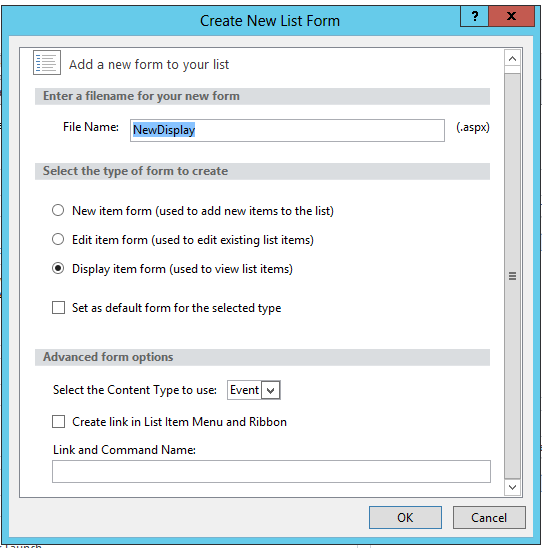
3.Under the form section, click on the "New" to create new Display form.

4.Then create a new Display form.


5. In created display form , find below code snippet.
          <tr>  
             <td width="190px" valign="top" class="ms-formlabel">  
               <H3 class="ms-standardheader">  
                 <nobr>Start Time</nobr>  
               </H3>  
             </td>  
             <td width="400px" valign="top" class="ms-formbody">  
               <xsl:value-of select="@EventDate"/>  
             </td>  
           </tr>  
           <tr>  
             <td width="190px" valign="top" class="ms-formlabel">  
               <H3 class="ms-standardheader">  
                 <nobr>End Time</nobr>  
               </H3>  
             </td>  
             <td width="400px" valign="top" class="ms-formbody">  
               <xsl:value-of select="@EndDate"/>  
             </td>  
           </tr>  
6. Replace it with below code.
             <td width="190px" valign="top" class="ms-formlabel">  
               <H3 class="ms-standardheader">  
                 <nobr>Start Time</nobr>  
               </H3>  
             </td>  
             <td width="400px" valign="top" class="ms-formbody">          
               <xsl:value-of select="msxsl:format-date(@EventDate, 'dd/MM/yyyy')"/> ,  
               <xsl:value-of select="msxsl:format-time(@EventDate, 'hh:mm tt')"/>  
             </td>  
           </tr>  
           <tr>  
             <td width="190px" valign="top" class="ms-formlabel">  
               <H3 class="ms-standardheader">  
                 <nobr>End Time</nobr>  
               </H3>  
             </td>  
             <td width="400px" valign="top" class="ms-formbody">  
               <xsl:value-of select="msxsl:format-date(@EndDate, 'dd/MM/yyyy')"/> ,  
               <xsl:value-of select="msxsl:format-time(@EndDate, 'hh:mm tt')"/>  
             </td>  
           </tr>  
7.You can use any date  and time format for the  'dd/MM/yyyy' ,'hh:mm tt'